The Report Options page permits you to control the appearance and content of your printed reports as well as the format in which to save the files to your disk.
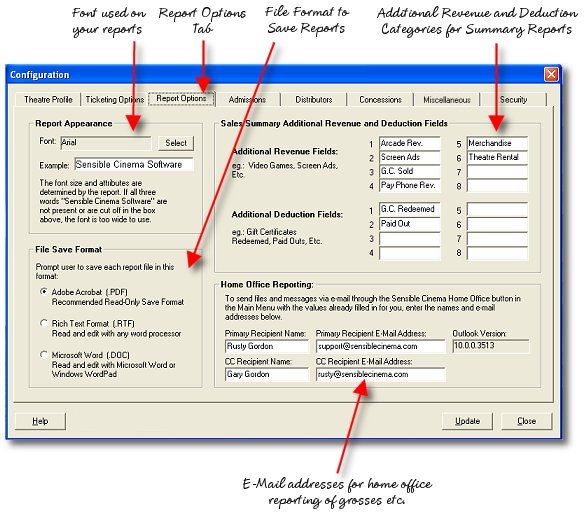
Report Appearance (Font) - This allows you to choose a font for your printed reports from a list of fonts available on your system. The font size and attributes are actually hard-coded in the report engine but you can select the typeface used provided the overall width, height and character set are appropriate. In other words, you couldn't use "Wingdings" because its character set is all symbols or an extra wide typeface because some of your report text would be truncated. Ensure that the words "Sensible Cinema Software" fully display in the Example Box and your reports should print in an acceptable manner. This setting is stored in the registry for the individual manager workstation. If you have more than one manager terminal, the font must be selected on each if you desire uniformity on your reports.
File Save Format - This allows you to choose a default format in which your reports will be saved to the disk. It will be the selected file type whenever a "save" or "save as" dialog box is displayed. The user can also select from five other formats at that time as well, but this is the one that is displayed initially. By default, the program has the Adobe Acrobat format selected. This is the ideal format because it gives you a protable format that is read-only--the user can't change the report text. RTF and DOC format bring up the report in an editable word processor document format. Other choices not shown here --but displayed in the save dialog box include EXCEL .XLS format, Hypertext Mark-Up Language .HTML and Text Document format .TXT. HTML is ideal for creating a web page that shows your movies and showtimes.
Sales Summary Additional Revenue and Deduction Fields - This allows you to add custom fields to your daily and weekly summary reports to account for other revenue besides those entered by the point of sale system, including theatre rentals, arcade revenue and so forth.
Home Office E-Mail Reporting - This allows you to enter a default e-mail address and CC address for use when sending reports and messages to your home office. In places where an e-mail button is displayed, a pre-filled message template is created using this address information. The manager simply adds the text and file attachments he intends to send.